Multi-effect for Skeleton
Companion
Effects that follow the sections of your song.
CLAP, VST3 and Audio Unit · macOS and Windows
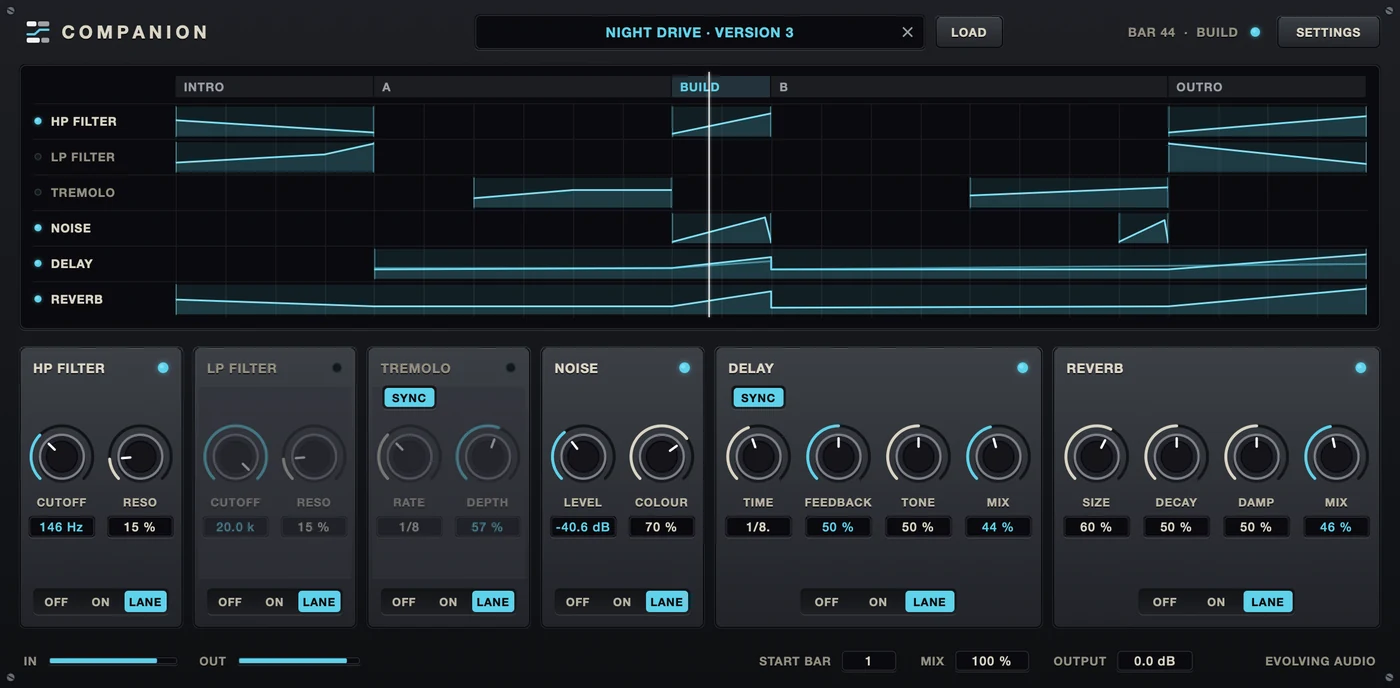
An arrangement also needs movement: a filter that opens through the intro, a reverb that swells into the drop. Companion plays those moves for you, from the arrangement you made in Skeleton.
Lanes
Drawn in Skeleton,
played in your host
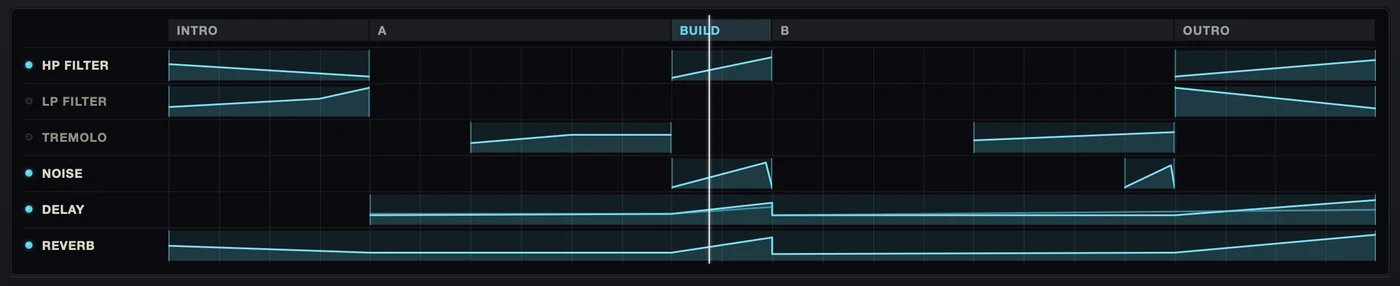
You draw automation lanes in Skeleton, along the sections of your arrangement. Export them, load them into Companion on a track or a bus, and press play.

Six effects
High pass, low pass, tremolo, noise, delay and reverb. A lane can switch each one in and move its controls.
Visible in your host
A lane moves the real parameters. Your host shows the moves in its own automation and can record them.
Clean section changes
When a section ends, delay and reverb tails play out and the other effects fade, so nothing clicks.
By hand, or on your other plug-ins
Take over by hand,
map the lanes to other effects
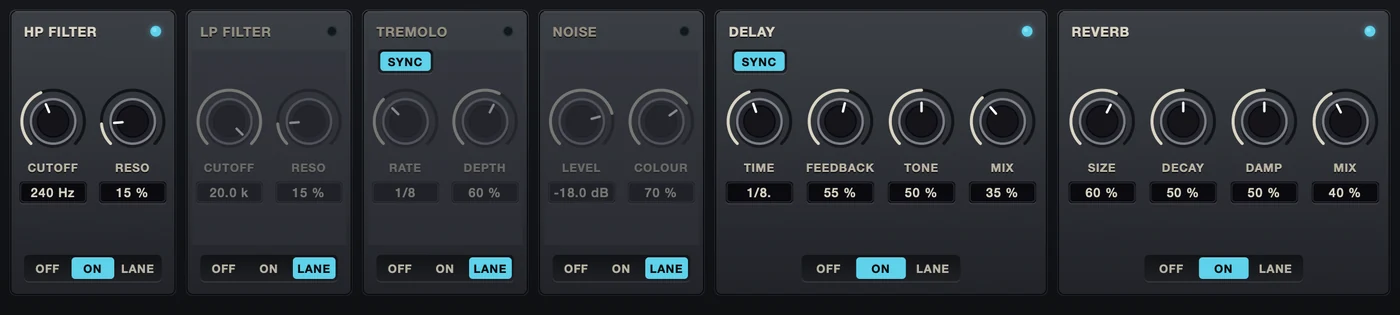
Every effect has a switch: Off, On or Lane. On Lane the arrangement controls it, shown in cyan. Take one over by hand and it turns cream and stays where you put it.
Companion comes with Param Link, a Max for Live device for Ableton Live. It maps the automation from Companion’s lanes to any parameter of any other effect or instrument, so your own plug-ins follow the arrangement too.
Get it
Coming with
Skeleton’s lanes
Companion is finished, but Skeleton cannot export lanes yet. Companion will be released as soon as it can.
Specs
System requirements
- macOS
- macOS 11 Big Sur or later, Apple silicon
- Windows
- Windows 10 or 11, 64-bit
- Formats
- CLAP, VST3, Audio Unit (macOS)
- Channels
- Stereo in, stereo out
- Latency
- None
- Lanes
- One file per arrangement, exported by Skeleton and saved with the session
- Automation
- Lane moves are reported to the host as parameter changes and can be recorded
- Ableton Live
- Param Link, a Max for Live device for driving other effects, is in the download. Needs Max for Live.
- Resolution
- Lane values reach the effects every 32 samples
- Window
- Five sizes, from 75 % to 150 %
Questions
Before you ask
Do I need Skeleton?
To have the effects follow an arrangement, yes: the lanes are drawn in Skeleton and exported from there.
Without a lane file Companion is a plain multi-effect. Every effect has a switch with Off, On and Lane, and with nothing loaded you simply use the first two.
Can Skeleton export lanes today?
Not yet. Automation lanes and their export are still to be built into Skeleton. Companion needs them, so it waits for them.
How does it know where the song is?
It reads the host’s song position on every block and looks that bar up in the lanes. Jump around the timeline and it follows.
If the arrangement does not start at bar 1 of your project, Start Bar on the panel moves it.
What if I move or delete the lane file?
Nothing. The file is saved inside the host’s session when you load it, so the project opens with its lanes on any machine.
Can I override the arrangement?
Per effect. Set its switch to On or Off and the lane is ignored for that effect — it stays where you put it and its knobs are yours.
A lane also only takes the parameters it has a curve for. Everything else stays on the knob, and the panel shows which is which: cyan is the lane, cream is your hand.
Can the lanes drive effects that are not Companion’s?
In Ableton Live, yes, with Param Link: a Max for Live device that comes in the download. It makes any parameter in the set follow any other, eight pairs to a device, and it is not tied to Companion at all.
Point its source at a Companion parameter and its target at a knob on your own effect, and the lane turns that knob. Point it at an Active output and the lane switches the effect on and off. The links are saved with the set.
It needs Live with Max for Live, and it has been used in Live 12 Suite. Other hosts are on their own for now.
Why is Param Link not installed with the plug-in?
Because where a Max for Live device lives is yours to decide — your User Library, a project folder, wherever you keep them. It is a file beside the installer; drag it into a set or put it with the others.
Which formats and hosts?
CLAP, VST3 and Audio Unit on macOS, CLAP and VST3 on Windows. The installer lets you pick which ones to install.
There is no standalone application: Companion follows a host’s transport, and on its own it would have nothing to follow.
Anything else: hello@evolving-audio.com