Saturation & character loop
Lichtenberg
Saturation that runs through its own delay loop.
Coming soon · CLAP, VST3 and Audio Unit · macOS and Windows · free demo
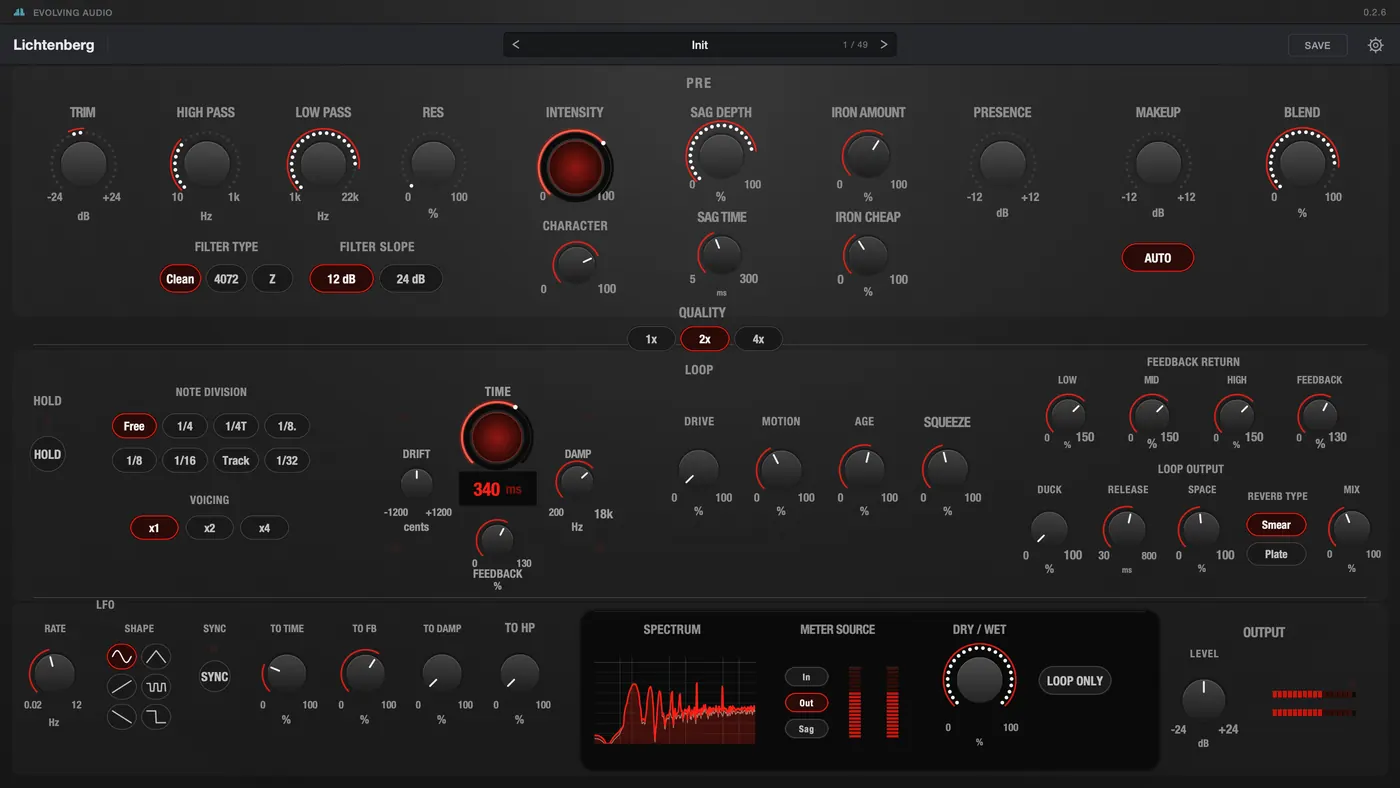
Lichtenberg is a saturator with a delay loop built around it. The loop sends the saturated signal back through its own character stages, so every repeat picks up more colour. The panel has three lanes: saturation, loop and motion.
Top lane · Saturation
Valve drive, a sagging supply
and transformer iron
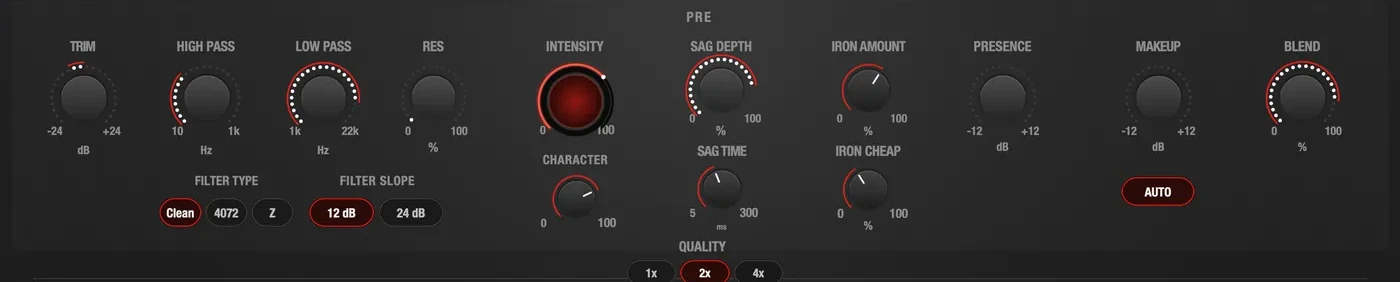
The top lane shapes the signal before it reaches the loop. The controls run from left to right in the order the signal passes them.
Filters
A high pass and a low pass in front of the saturation, at 12 or 24 dB per octave, in three models: Clean, 4072 and Z.
Drive and sag
Intensity sets how hard the valve stage is driven and Character moves it from soft warmth to bite. Sag makes the supply dip under loud transients and recover.
Iron and output
A transformer stage with a control for how cheap the iron is. Presence brings the top end back, Makeup follows the drive, Blend mixes in the dry signal, and oversampling goes up to 4×.
Middle lane · Loop
A delay that feeds
back through its own stages
The middle lane is a delay loop. Its character stages sit inside the feedback path, so a repeat that has gone round five times has been processed five times.

Time and pitch
Set the delay freely or lock it to the host tempo. Track tunes it to the note that is playing, so the loop rings like a string. Drift shifts the pitch a little further on every pass.
Character in the loop
Drive, Motion, Age and Squeeze sit inside the feedback path and act again on every repeat. Feedback goes up to 130%.
Feedback and output
Low, Mid and High set how much of each band is fed back. Hold freezes the loop, Duck moves it out of the way of the input, and Space adds a Smear or Plate reverb.
Bottom lane · Motion
One LFO,
four destinations
Send it to the delay time, the feedback, the damping or the input high pass, or to all four at once.

LFO
Six shapes, free from 0.02 to 12 Hz or locked to the host tempo, with dotted and triplet values.
Four destinations
Delay time, feedback, damping and the input high pass. Each one has its own amount.
Metering and output
A spectrum analyser and level meters that can show the input, the output or the sag. Next to them: dry/wet, Loop Only and the output level.
Get it
Try it on a mix
before you decide
Demo
Freeno time limit
- Every control, every preset
- All formats, both systems
- Three seconds of silence in every forty-five
Full licence
Pay onceno subscription · price to be announced
- Uninterrupted audio
- Offline activation for studio machines
- Updates for the life of the version
- macOS and Windows, one licence
Lichtenberg is not on sale yet. The demo and the shop open at launch.
Specs
System requirements
- macOS
- macOS 11 Big Sur or later, Apple silicon
- Windows
- Windows 10 or 11, 64-bit
- Formats
- CLAP, VST3, Audio Unit (macOS), standalone application
- Channels
- Stereo in, stereo out
- Oversampling
- 1×, 2× or 4×, switchable
- Presets
- Factory bank by job, and your own
- Metering
- Spectrum analyser and level meters, switchable between input, output and the sag rail
- Internet
- For activation and to check for updates. A licensed copy keeps working offline.
- Licence
- Perpetual, with offline activation
Questions
Before you ask
What does the demo do?
Everything, with three seconds of silence in every forty-five. Nothing else is held back: all controls, all presets, no time limit, no nag screen.
Enter a licence key in Settings and the silence stops. It is the same file either way — there is nothing to reinstall and nothing to reload.
Which formats and hosts?
CLAP, VST3 and Audio Unit on macOS, CLAP and VST3 on Windows, plus a standalone application on both. The installer lets you pick which ones to install.
CLAP is the native format; the others are built from the same code, so they behave identically.
What if the studio machine has no internet?
There is a page for that. The plug-in shows a request code, you type it with your licence key into evolving-audio.com/offline on any device that is online, and you carry the file it gives you back on a stick.
No email, no waiting for support. The licence is signed for that one machine.
Can I resize the window?
Yes, and it changes the moment you pick a size — in Settings, or by dragging the window in a host that allows it. Both land on the same steps, and the choice is remembered on that computer.
How many computers?
A licence can be activated on more than one machine, and an activation can be given back from Settings when you move to another computer.
Anything else: hello@evolving-audio.com